Hidden Google Ads Benefits Most Business Owners Don’t Know

Introduction
You can reach your customers quickly with Google Ads, who are actively searching for your products or services. Most beginners know they can create ads and pay for clicks. Few know about the hidden benefits that help businesses save money, simplify billing, and scale advertising.
If you’re planning to run Google Ads for the first time, this guide explains several features that many business owners miss.
Google Ads Promotional Credits
In addition to Google Ads Promotional Credits, there are many other hidden benefits.
Google periodically offers advertising credits to eligible advertisers. These credits help new advertisers reduce their initial advertising costs.
How Promotional Credits Work
A common example looks like this:
“Spend ₹20,000 and receive ₹20,000 in Google Ads credit.”
This does not mean Google gives you ₹20,000 immediately.
The process usually works like this:
• You create a new Google Ads account.
• Your account must qualify for the promotion.
• You spend the required amount within the promotional period.
• Google verifies your eligibility.
• The promotional credit is automatically added to your account.
• Credits are then used to pay for future advertising.
The promotion amount and eligibility rules vary by country and campaign type.
Who May Be Eligible?
Generally, promotional credits are available for:
• New Google Ads accounts.
• Businesses using an eligible payment method.
• promotional offered accounts.
• Businesses that meet Google’s terms and conditions.
Existing advertisers usually cannot claim new account promotional offers.
Always check the current promotion available in your country before creating your account.
Google Ads Monthly Invoicing

Most beginners use prepaid or automatic card payments.
Large businesses often use a different billing option called Monthly Invoicing.
Instead of paying every day, Google sends one invoice after the billing period.
This works similarly to receiving a monthly utility bill.
Benefits of Monthly Invoicing
• Easier accounting.
• Better cash flow management.
• Multiple transactions are replaced with one invoice.
• Suitable for businesses with high advertising budgets.
• Ideal for companies with finance departments.
Who Can Qualify?
Monthly invoicing is generally available to businesses that:
• Spend significant amounts on Google Ads.
• Have an established payment history.
• Meet Google’s credit approval requirements.
• Operate as registered businesses.
Google reviews each application before approval.
Not every advertiser qualifies immediately.
Google Ads Billing Methods Explained
Google offers different payment methods depending on your country and account type.
Automatic Payments
This is the most common option.
Google charges your payment method after your ads receive clicks.
You pay after advertising costs accumulate.
Best for:
• Small businesses.
• Beginners.
• Freelancers.
• Local businesses.
Manual Payments
You add money before your ads start running.
As your ads receive clicks, Google deducts the amount from your balance.
When the balance reaches zero, your ads stop until you add more funds.
Best for:
• Businesses with fixed budgets.
• Schools.
• NGOs.
• Advertisers who want strict spending control.
Monthly Invoicing
Google provides advertising first.
The invoice is paid later according to agreed payment terms.
Best for:
• Medium and large businesses.
• Agencies.
• Enterprise advertisers.
What Happens After You Spend ₹20,000 on Google Ads?
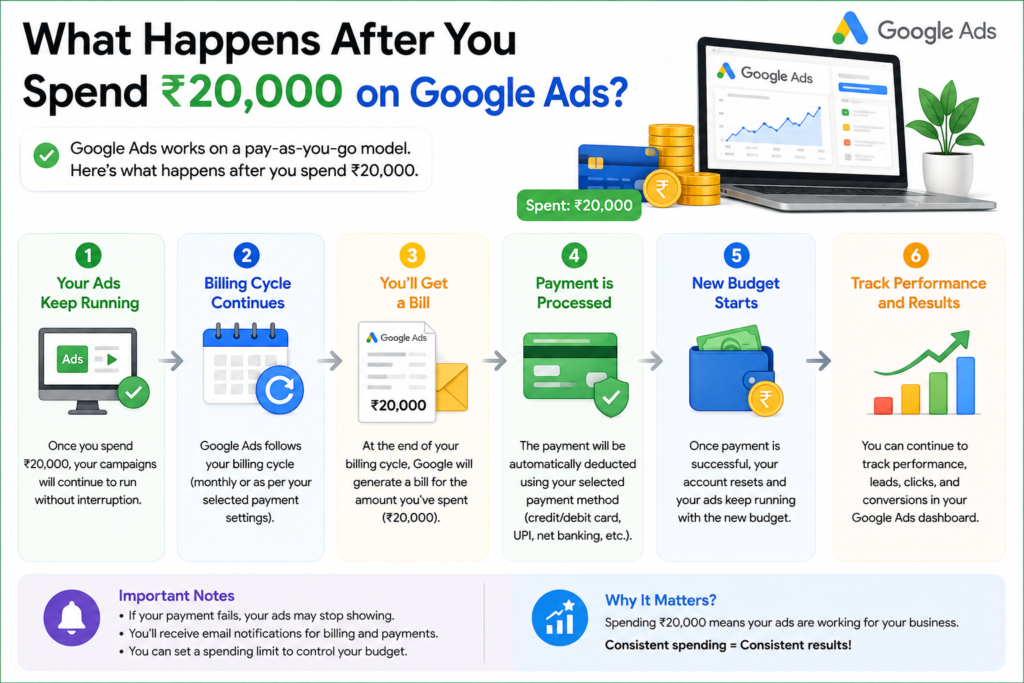
Many beginners notice Google charging their payment method before reaching their daily budget.
This is normal.
Google uses something called a Billing Threshold.
What is a Billing Threshold?
A billing threshold is the amount of advertising spend that triggers a payment.
For new advertisers, Google usually starts with a smaller threshold.
For example:
• ₹2,000
• ₹5,000
• ₹10,000
As your account builds a good payment history, Google may automatically increase your threshold.
Eventually, many advertisers reach higher billing thresholds.
This means fewer payment transactions and smoother billing.
Spending ₹20,000 Doesn’t Mean One Payment
Suppose your billing threshold is ₹5,000.
If you spend ₹20,000 during the month, Google may charge your payment method approximately four times.
If your billing threshold later increases to ₹20,000, Google may charge only once after reaching that amount or at the end of the billing cycle, whichever comes first.
The threshold is determined by Google based on your account’s payment history and other factors. Advertisers cannot manually choose their billing threshold.
Google Ads Automatically optimizes Over Time
Another hidden benefit is that Google learns from campaign performance.
As more people click and convert, Google’s machine learning gathers more data.
With proper campaign setup, this often helps improve targeting and campaign efficiency over time.
This is why experienced advertisers avoid making major campaign changes every day.
Google Ads Gives Detailed Customer Insights
Google Ads provides valuable information beyond clicks.
You can learn:
• Which keywords generate leads.
• Which cities perform best.
• Which devices customers use.
• What time of day delivers the best results.
• Which ads receive the highest click-through rates.
These insights help improve both your advertising and your website.
Google Ads Works Well with Other Google Products
Google Ads integrates with:
• Google Analytics
• Google Tag Manager
• Google Merchant Center
• YouTube
• Google Business Profile
Connecting these tools gives a clearer picture of customer behavior and campaign performance.
Tips for Beginners
If you’re new to Google Ads:
• Start with Search Campaigns.
track conversions before launching your campaign.
• Focus on high-intent keywords.
• Use location targeting.
• Set realistic daily budgets.
• Review search terms regularly.
• Don’t judge results after only a few days.
Final Thoughts

Google Ads offers much more than paid search advertising. Features like promotional credits, flexible billing methods, billing thresholds, and monthly invoicing can make advertising easier and more cost-effective for eligible businesses.
Understanding how these features work helps you avoid common mistakes and manage your advertising budget with confidence.
Whether you’re a local business, startup, or growing company, learning these hidden benefits can help you get more value from every advertising rupee.
Frequently Asked Questions
Can existing Google Ads accounts receive promotional credits?
Most promotional credits are designed for new advertisers. Existing accounts generally are not eligible unless Google launches a specific offer.
Does everyone qualify for monthly invoicing?
No. Monthly invoicing is typically available only to businesses that meet Google’s eligibility and credit requirements.
Can I change my billing method later?
In many cases, yes. The available billing options depend on your country, payment history, and account type.
Why did Google charge my card before my monthly budget was reached?
Google charges based on your billing threshold or at the end of your billing cycle, whichever comes first.
Is Google Ads suitable for small businesses?
Yes. Even businesses with modest budgets can run effective campaigns by targeting the right keywords and tracking conversions.